
时间:2023-05-02 16:25
人气:
作者:admin
VLAN(Virtual Local Area Network, 虚拟局域网)是指在一个物理网段内,进行逻辑的划分,划分成若干个虚拟局域网。VLAN的最大特性是不受物理位置的限制,可以进行灵活的划分。VLAN具备了一个物理网段所具备的特性。
相同VLAN内的主机可以互相直接访问,不同VLAN间的主机之间互相访问必须经由路由设备进行转发。广播数据包只可以在本VLAN内进行传播,不能传输到其他VLAN中。
如果VLAN间需要通信,则需要通过三层交换机或路由器实现其路由功能。其主要目的是使在同一VLAN里的计算机系统能跨交换机进行相互通信,而在不同VLAN里的计算机系统也能进行相互通信。
二层交换机VLAN配置地址,称之为 远程管理IP。一个二层交换,只能有一个处于up状态的VLAN管理IP。三层交换机VLAN配置地址,称之为三层SVI虚接口地址,用于不同VLAN之间互相访问,实现路由功能。
方法:三层交换起用SVI虚接口,配置IP地址,作为VLAN内PC的网关地址,实现VLAN互访,这是启用三层交换的路由功能。
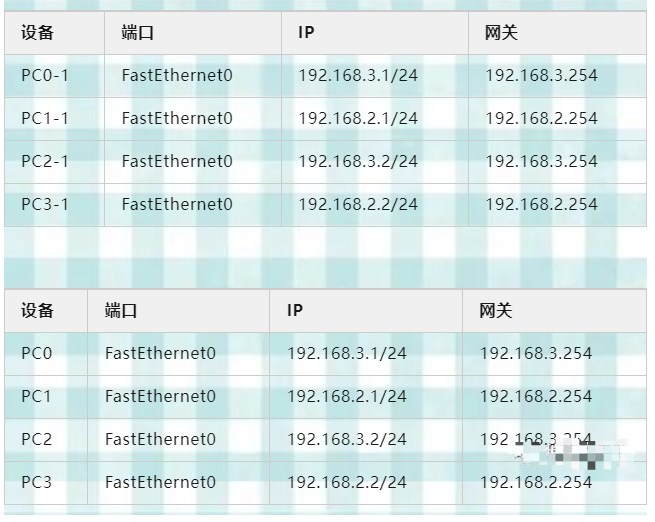
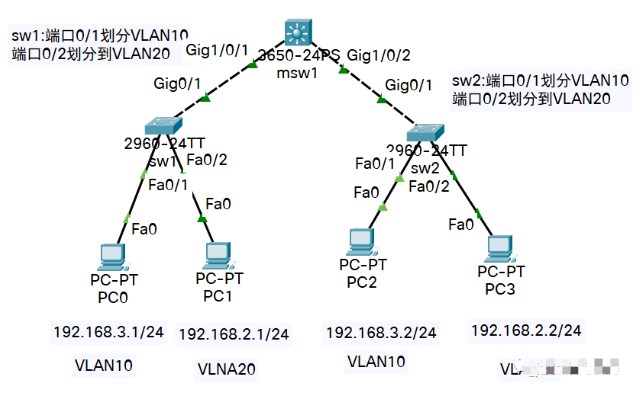

两台交换机分别连接三层

#二层交换机配置
Switch0>en
Switch0#hostname sw0
sw0#conf t
sw0(config)#vlan 10
sw0(config-vlan)#ex
sw0(config)#vlan 20
sw0(config-vlan)#ex
sw0(config)#int fa0/1
sw0(config-if)#sw mo ac
sw0(config-if)#sw ac vlan 10
sw0(config-if)#no sh
sw0(config-if)#ex
sw0(config)#int fa0/2
sw0(config-if)#sw mo ac
sw0(config-if)#sw ac vlan 20
sw0(config-if)#no sh
sw0(config-if)#ex
#连接三层交换机的口改为 trunk
sw0(config)#int g0/1
sw0(config-if)#sw mo tr
sw0(config-if)#no sh
sw0(config-if)#
#另一台交换机或者其它交换机按照以上配置再来一次即可,配置之前改下名称
Switch#hostname sw1

#三层交换机配置
Switch>en
Switch#conf t
Enter configuration commands, one per line.  End with CNTL/Z.
Switch(config)#hostname msw0
msw0(config)#vlan 10
msw0(config-vlan)#vlan 20
msw0(config-vlan)#ex
msw0(config)#int vlan 10
msw0(config-if)#
%LINK-5-CHANGED: Interface Vlan10, changed state to up
msw0(config-if)#ip add 192.168.3.254 255.255.255.0
msw0(config-if)#no sh
msw0(config-if)#ex
msw0(config)#int vlan 20
msw0(config-if)#
%LINK-5-CHANGED: Interface Vlan20, changed state to up
msw0(config-if)#ip add 192.168.2.254 255.255.255.0
msw0(config-if)#no sh
msw0(config-if)#ex
#开启三层交换机路由功能
msw0(config)#ip routing
msw0(config)#ex
msw0#

#一般情况下,switchport trunk encapsulation dot1q命令可不做,因为默认为dot1q封装,简写 sw tr e d
#msw0(config)#int g1/0/1
#msw0(config-if)#switchport trunk encapsulation dot1q
#msw0(config-if)#exit
#msw0(config)#int g1/0/2
#msw0(config-if)#sw tr e d
#msw0(config-if)#exit
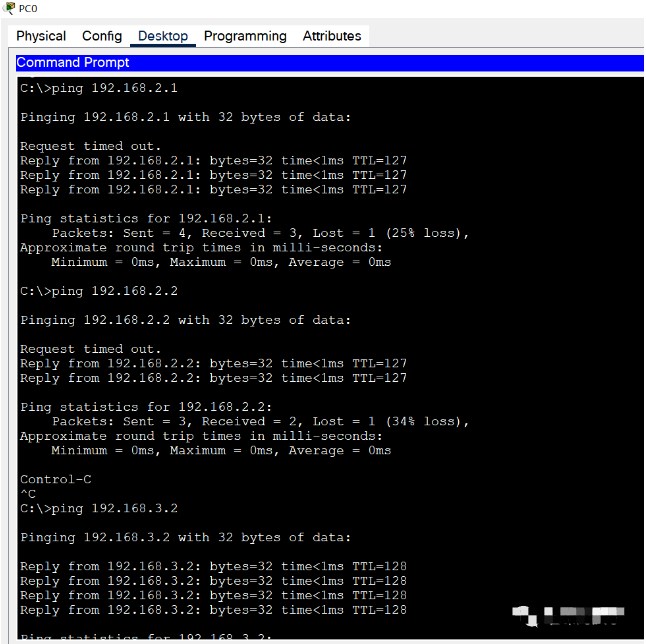
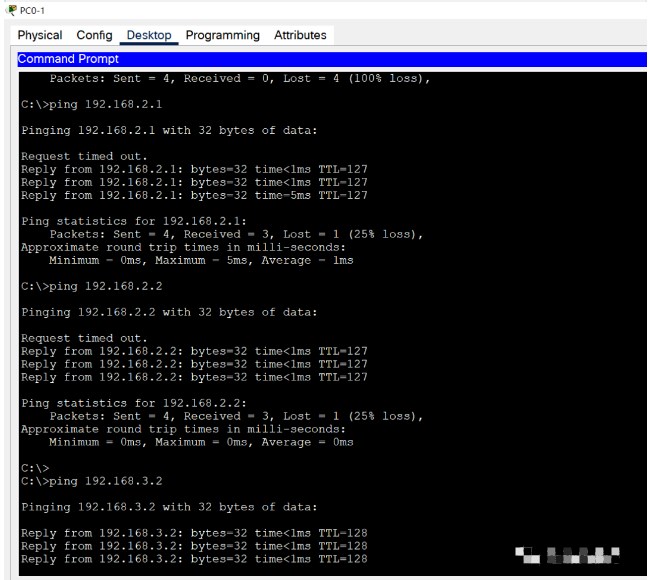
两台交换机通过一台三层连接
#二次交换机配置
Switch0>en
Switch0#hostname sw0-1
sw0-1#conf t
sw0-1(config)#vlan 10
sw0-1(config-vlan)#ex
sw0-1(config)#vlan 20
sw0-1(config-vlan)#ex
sw0-1(config)#int fa0/1
sw0-1(config-if)#sw mo ac
sw0-1(config-if)#sw ac vlan 10
sw0-1(config-if)#no sh
sw0-1(config-if)#ex
sw0-1(config)#int fa0/2
sw0-1(config-if)#sw mo ac
sw0-1(config-if)#sw ac vlan 20
sw0-1(config-if)#no sh
sw0-1(config-if)#ex
#另一台交换机或者其它交换机按照以上配置再来一次即可,配置之前改下名称
Switch#hostname sw1-1

#连接三层交换机的口改为 trunk
sw0-1(config)#int g0/2
sw0-1(config-if)#sw mo tr
sw0-1(config-if)#no sh
sw0-1(config-if)#
sw0-1#

#其中两台交换机之间的连接口做如下配置
Switch(config)#int g0/1
#配置端口为trunk,简写sw mo tr
Switch(config-if)#switchport mode trunk
#允许所有vlan通过
Switch(config-if)#switchport trunk allowed vlan all
Switch(config-if)#no sh
Switch(config-if)#ex

#三层交换机配置
Switch>en
Switch#conf t
Enter configuration commands, one per line.  End with CNTL/Z.
Switch(config)#hostname msw0
msw0(config)#vlan 10
msw0(config-vlan)#vlan 20
msw0(config-vlan)#ex
msw0(config)#int vlan 10
msw0(config-if)#
%LINK-5-CHANGED: Interface Vlan10, changed state to up
msw0(config-if)#ip add 192.168.3.254 255.255.255.0
msw0(config-if)#no sh
msw0(config-if)#ex
msw0(config)#int vlan 20
msw0(config-if)#
%LINK-5-CHANGED: Interface Vlan20, changed state to up
msw0(config-if)#ip add 192.168.2.254 255.255.255.0
msw0(config-if)#no sh
msw0(config-if)#ex
#开启三层交换机路由功能
msw0(config)#ip routing
msw0(config)#ex
msw0#

#一般情况下,switchport trunk encapsulation dot1q命令可不做,因为默认为dot1q封装,简写 sw tr e d
#msw0(config)#int g1/0/1
#msw0(config-if)#switchport trunk encapsulation dot1q
#msw0(config-if)#exit
#msw0(config)#int g1/0/2
#msw0(config-if)#sw tr e d
#msw0(config-if)#exit
下一篇:ABAQUS中的损坏与失效模型

 关注微信
关注微信