
时间:2023-03-06 10:01
人气:
作者:admin
实验拓扑
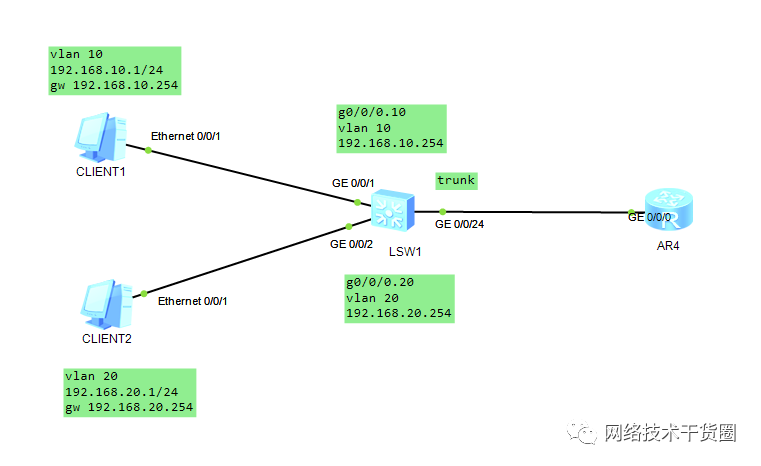
SWH1配置
The device is running!sys Enter system view, return user view with Ctrl+Z. [Huawei]sys swh [swh]vlan batch 10 20 [swh]int g0/0/1 [swh-GigabitEthernet0/0/1]port link-type acc [swh-GigabitEthernet0/0/1]port default vlan 10 [swh-GigabitEthernet0/0/1]int g0/0/2 [swh-GigabitEthernet0/0/2]port link-type acc [swh-GigabitEthernet0/0/2]port default vlan 20 [swh-GigabitEthernet0/0/2]q [swh]dis vlan The total number of vlans is : 3 -------------------------------------------------------------------------------- U: Up; D: Down; TG: Tagged; UT: Untagged; MP: Vlan-mapping; ST: Vlan-stacking; #: ProtocolTransparent-vlan; *: Management-vlan; 网络技术干货圈 -------------------------------------------------------------------------------- VID Type Ports -------------------------------------------------------------------------------- 1 common UT:GE0/0/3(D) GE0/0/4(D) GE0/0/5(D) GE0/0/6(D) GE0/0/7(D) GE0/0/8(D) GE0/0/9(D) GE0/0/10(D) GE0/0/11(D) GE0/0/12(D) GE0/0/13(D) GE0/0/14(D) GE0/0/15(D) GE0/0/16(D) GE0/0/17(D) GE0/0/18(D) GE0/0/19(D) GE0/0/20(D) GE0/0/21(D) GE0/0/22(D) GE0/0/23(D) GE0/0/24(U) 10 common UT:GE0/0/1(U) 20 common UT:GE0/0/2(U) VID Status Property MAC-LRN Statistics Description -------------------------------------------------------------------------------- 1 enable default enable disable VLAN 0001 10 enable default enable disable VLAN 0010 20 enable default enable disable VLAN 0020 [swh]int g0/0/24 [swh-GigabitEthernet0/0/24]port link-type trunk [swh-GigabitEthernet0/0/24]port trunk allow-pass vlan 10 20 [swh-GigabitEthernet0/0/24]q [swh]
R1配置
注意:如果在实验过程中某个端口配置错了,可以使用undo shutdown初始化端口配置。
sys
Enter system view, return user view with Ctrl+Z.
[Huawei]
[Huawei]sys R1
[R1]

[R1]int g0/0/0.10     #子接口10用来和接受vlan10
[R1-GigabitEthernet0/0/0.10]dot1q termination vid 10   #意思是这个接口接在vlan10上面
[R1-GigabitEthernet0/0/0.10]ip add 192.168.10.254 24
Oct 22 2020 2338-08:00 R1 %%01IFNET/4/LINK_STATE(l)[0]:The line protocol IP
on the interface GigabitEthernet0/0/0.10 has entered the UP state.
[R1-GigabitEthernet0/0/0.10]
[R1-GigabitEthernet0/0/0.10]arp broadcast enable    #启用子接口的ARP广播功能,公众号:wljsghq
[R1-GigabitEthernet0/0/0.10]q

[R1]int g0/0/0.20
[R1-GigabitEthernet0/0/0.20]dot1q termination vid 20
[R1-GigabitEthernet0/0/0.20]ip add 192.168.20.254 24
Oct 22 2020 2319-08:00 R1 %%01IFNET/4/LINK_STATE(l)[1]:The line protocol IP
on the interface GigabitEthernet0/0/0.20 has entered the UP state.

[R1-GigabitEthernet0/0/0.20]arp broadcast enable

[R1-GigabitEthernet0/0/0.20]dis this
[V200R003C00]
#
interface GigabitEthernet0/0/0.20
 dot1q termination vid 20
 ip address 192.168.20.254 255.255.255.0
 arp broadcast enable
#
return
[R1-GigabitEthernet0/0/0.20]
查看路由器的配置
[R1]display ip interface brief
*down: administratively down
^down: standby
(l): loopback
(s): spoofing
The number of interface that is UP in Physical is 4
The number of interface that is DOWN in Physical is 1
The number of interface that is UP in Protocol is 3
The number of interface that is DOWN in Protocol is 2

Interface                         IP Address/Mask      Physical   Protocol
GigabitEthernet0/0/0              unassigned           up         down
GigabitEthernet0/0/0.10           192.168.10.254/24    up         up
GigabitEthernet0/0/0.20           192.168.20.254/24    up         up
GigabitEthernet0/0/1              unassigned           down       down
NULL0                             unassigned           up         up(s)
[R1]
编辑:黄飞


 关注微信
关注微信