
时间:2009-04-28 11:19
人气:
作者:admin
To evaluate the DS1856, use the tables and text for the DS1858. The only exception to using the DS1858 markings is that the WP (WPEN) pin does not exist on the DS1856. Therefore, the jumper on the PCB for WP may be left in any state, including floating.
http://files.dalsemi.com/system_extension/EVKits/DS185XEVKit/
Besides adding DS1856 support, several other software improvements allow easier evaluation of DS185X parts. If the application is started and the DS1856 is not an option in the "Select a Device..." window, then a new version of the software must be obtained. Software version V1.4 and newer includes DS1856 support. A list of changes and improvements can be found in the readme.txt file available with the software on the FTP site.
Several new software features and updates are noteworthy. First, in the General page (Figure 1), a Memory Configuration box has been added to control the ADEN bit (PW2 clearance is required). Second, two other boxes have been added to program the passwords (PW1/PW2) and grant clearance by entering password entry bytes. Third, in the Memory page (Figure 2), the Table Select box has been changed to accommodate more tables and allow easier data entry.
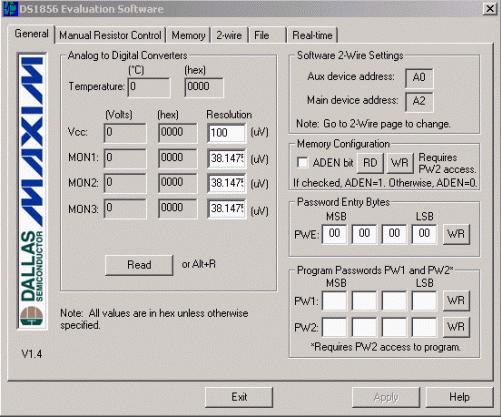
Figure 1. General page.
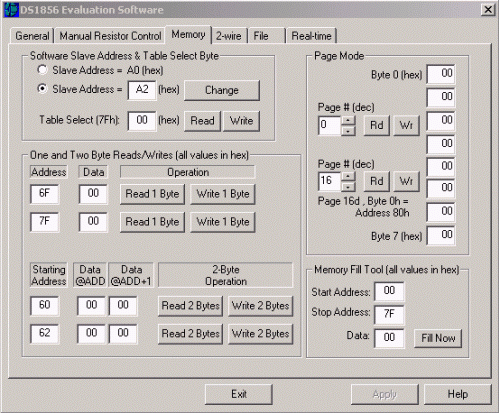
Figure 2. Memory page.
Digital Outputs
OUT1 and OUT2 can be sampled at the test points with a multimeter or an oscilloscope for most evaluation purposes. The outputs are open drain, so a pullup resistor (not provided on the PC board) must be used to output a high state. The test points also provide an easy way to connect to external circuitry for further evaluation.
Resistor Terminals
The resistor test points can be used to attach the DS1856's resistors to external circuitry for evaluating the device. If the low terminal requires a connection to ground or the high terminal requires a connection to VCC, connection can be made by changing the jumper positions in the jumper block. If the resistor values are not changing as expected with adjustments made in the software, then check the following software settings. First, to change the resistor settings manually, the DS1856 must have PW2 clearance (granted in the General page). Second, the TEN bit (in the mode byte) must be high, and this also requires PW2 clearance. Lastly, the SoftHiz bit [HIZCO] must be low and requires at least PW1 clearance.
Monitor Inputs
Typically, the monitor inputs are driven by a bench supply during evaluation. The software displays the monitor pins' voltages on the Real-Time page as well as the General page. Precautions should be taken not to exceed the absolute maximum ratings prescribed by the evaluation part's datasheet.
Questions/comments/suggestions concerning this application note can be sent t MixedSignal.Apps@dalsemi.com


 关注微信
关注微信