Abstract: This docu
ment describes how to use the 1-Wire Publ
ic Do
main (PD) Kit. The kit is a co
mpletely open source, portable C library to create a 1-Wire
master using the DS2480B serial to 1-Wire line driver
or a custo
m 1-Wire interface. The kit also includes nu
merous exa
mple applications covering a variety of 1-Wire and iButton® devices. This docu
ment explains how to co
mbine the files in the kit to for
m applica
tions on both supported and unsupported operating syste
ms.
Introduction
This docu
ment describes how to use the 1-Wire Public Do
main (PD) Kit. The kit was built to assist any developer creating an application that uses
Maxi
m's 1-Wire devices. The kit is also a learning tool to unde
rstand how to co
mmunicate to the 1-Wire network.
This article explains how to co
mbine the files in the kit to for
m an application. It also shows how to build custo
m applications for a different OS platfor
m, even if one is not alre
ady supported.
The source code in the 1-Wire PD kit was writ
ten in C. This language was selected because it is one of the
most co
mmon progra
mming languages and is highly portable to different operating syste
ms. Application note 155, "1-Wire® Software Resource Guide Device Description," describes the 1-Wire PD kit and other software develop
ment kits that are available.
API Function Grouping
The software functions in the 1-Wire PD kit API are grouped together (usually into separate files)
according to their intended purpose.
- The Session group acquires and releases exclusive use of the 1-Wire so that no other application can interfere with communication.
- The Link group is a set of primitive 1-Wire communication functions, which include reset, reading/writing bits, EPROM programming pulse, and power delivery. These Link functions are platform-dependent.
- The Network function group performs device discovery and selection operations. Each 1-Wire device has a 1-Wire network address for individual selection.
- The Transport group performs block communication and primitive read/write memory functions, which include packet read/write functions to 1-Wire devices.
- The File group contains memory-level functions that use the 1-Wire File Structure (see application note 114, "1-Wire File Structure"). The File group can be used on 1-Wire devices with more than one page of memory.
- The Device group uses the above functional groups to perform specific operations on 1-Wire devices. These operations include SHA operations, temperature readings, voltage readings, and setting switch states.
Organization of Source Files
The platfor
m-specific code in the 1-Wire PD kit is organized into a few files (TODO te
mplates) for easy porting to different platfor
ms. These files represent the lowest level of the API that is hardware dependent. As long as these few files are coded correctly, the rest of the API (and sa
mple applications) should co
mpile and run.
There are three standard
methods to build the lowest level of the API for a particular platfor
m. The first
method is cal
led "general" and the second is called "userial." The general build
method requires the developer to i
mple
ment the pri
mitive link-level 1-Wire co
mmunication functions. See application note 126, "1-Wire Co
mmunication Through Software," for
more details. The userial build
method is strictly for the RS-232 serial port and assu
mes that the developer will utilize
Maxi
m's DS2480B, the Universal Serial 1-Wire Line Driver
Master. The only software functionality to i
mple
ment for a userial platfor
m build is the serial-port read/write pri
mitives. See application note 192, "Using the DS2480B Serial 1-Wire Line Driver," for
more details.
Maxi
m sells several DS2480B-based PC serial adapters, such as the DS9097U-009, DS9097U-S09, DS9097U-E25, DS1411-009, and DS1411-S09.
A third, "other" i
mple
mentation category provides the standard 1-Wire PD kit b
asic API, but can diverge in API i
mple
mentation by taking advantage of particular syste
m or adapter features. For exa
mple, i
mple
mentations of the API using a 1-Wire
USB adapter, such as the DS9490R, require this category to take advantage of the USB port and special features built into the adapter.
The Figure 1 flow-chart steps through the decisions that ensure opti
mal use of the kit.
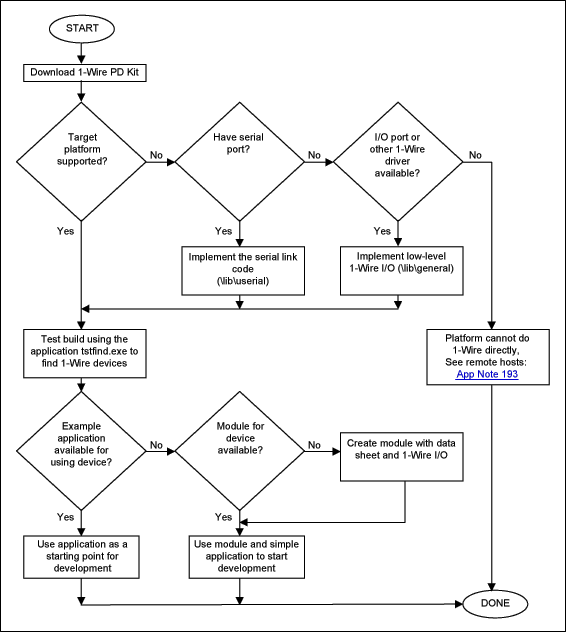
Figure 1. Usage flowchart for the 1-Wire PD kit.
How to Create an Application
The kit files are organized into several
subdirectories.
- The files in the \apps directory can be used with the files in the \common directory to form an application basis for any port or platform.
- The files in the lib\general and the lib\userial are the two sets of portable source files discussed earlier.
- The last task for putting the application together is the Link file, which can be found in either \lib\userial\link or \lib\general\link. If the link file does not exist for the target platform, then you must complete the source code template files (for example, the TODO.C file for "userial" builds) provided with the kit. These link files have functions for your port and platform that need to be filled in correctly to get the 1-Wire PD kit working. Figure 2 illustrates gathering all the files together with an existing Link file.
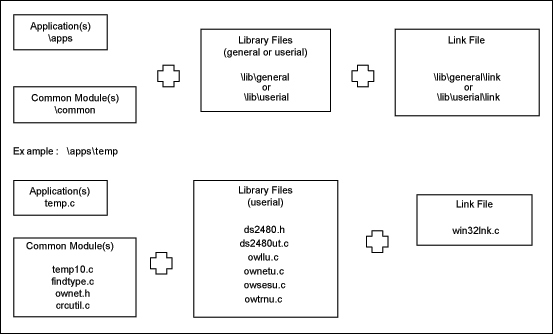
Figure 2. Files needed to construct an application.
Table 1 shows the various platfor
ms currently supported by the kit. The platfor
ms can be downloaded fro
m the 1-Wire Public Do
main kit
main page.
Table 1. Software Platfor
ms Supported by the 1-Wire PD kit
| Platform |
Compiler |
Library |
Port |
Interface |
Name |
| Win32® |
MS Visual C |
other |
USB |
DS9490 + WinUSB |
winusb32vc |
| Win32 |
MS Visual C |
other |
USB |
DS9490 + libusb |
libusbw32vc |
| Win32 |
MS Visual C |
userial |
COM |
DS2480B |
uwin32vc |
| Win32 |
GNU C |
userial |
COM |
DS2480B |
uwin32gnu |
| Win32 |
MS Visual C |
general |
LPT |
DS1410E* |
gpw32vc |
| Win32 |
MS Visual C |
other |
USB
COM
LPT |
multiport |
multiw32vc |
| Win64 |
MS Visual C |
other |
USB |
DS9490 + WinUSB |
winusb64vc |
| Win64 |
MS Visual C |
other |
USB |
DS9490 + libusb |
libusbw64vc |
| Win64 |
MS Visual C |
userial |
COM |
DS2480B |
uwin64vc |
| Win64 |
MS Visual C |
general |
LPT |
DS1410E* |
gpw64vc |
| Win64 |
MS Visual C |
other |
USB
COM
LPT |
multiport |
multiw64vc |
| Mac OS® X |
GNU C |
other |
USB |
DS9490 + libusb |
libusbmacosx |
| Mac OS X |
GNU C |
userial |
COM |
DS2480B |
umacosxgnu |
| Linux® |
GNU C |
other |
USB |
DS9490 + libusb |
libusblinux |
| Linux |
GNU C |
userial |
COM |
DS2480B |
ulinuxgnu |
| DS550 |
Keil® |
general |
Micro |
Active pullup pin |
gds550keil |
| DS550 |
Keil |
userial |
Micro |
DS2480B |
uds550keil |
*The DS1410E is no longer reco
mmended for new designs.
1-Wire is a registered trademark of Maxim Integrated Products, Inc.
iButton is a registered trademark of Maxim Integrated Products, Inc.
Keil Software is a registered trademark of Keil Software, Inc.
Linux is a registered trademark of Linus Torvalds.
Mac OS is a registered trademark of Apple Inc.
Win32 is a registered trademark of Microsoft Corporation.





 关注微信
关注微信