
时间:2009-04-23 14:03
人气:
作者:admin
All development for this application note was done using the DS89C440 and the High-Speed Microcontroller Evaluation Kit Board (Rev B). The C application was created and compiled using Keil's µVision2 version 2.40 and the Keil C51 Compiler version 7.10. The compiled application was loaded into the DS89C440 flash memory using the Microcontroller Tool Kit version 2.1.03.
Creating a New Project
In Keil µVision2, select Project -> Create New Project from the menu. Enter the name of your new project.
The Select Device for Target dialog will appear as shown below in Figure 1. Under Database, select Dallas Semiconductor and the particular microcontroller you are using (the DS89C430, DS89C440, or DS89C450). Hit OK to continue.

Figure 1. Selecting the device for a new Keil µVision2 project.
A new dialog box will ask, "Copy 8051 Startup Code to Project Folder and Add File to Project?" Select YES.
Setting Project Options
When the project window opens on the left, open up Target 1. Right click on Target 1, and select Options for Target 'Target 1'. An Option dialog box will appear. Select the Target tab. Change the settings in this tab as follows.
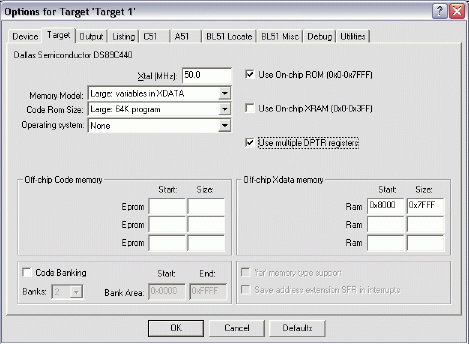
Next, select the Output tab. Set the checkbox for Create Hex File. This hex file will be required to load the project code into the microcontroller using the Microcontroller Tool Kit.
Adding the Project Code Open a new file and enter the following C code:
#include#include // Initialize serial port 0 to 14400 baud (16.384MHz crystal) serialInit() { TMOD = 0x21; // Timer 1: 8-bit autoreload from TH1 TH1 = 220; // 14400 baud rate CKMOD = 0x38; // Use system clock for timer inputs T2CON = 0x00; // Serial 0 runs off timer 1 overflow TCON = 0x50; // Enable timers 0 and 1 SCON0 = 0x50; // Enable serial port 0 SBUF0 = ' '; } void main() { serialInit(); // Initialize serial port 0 printf("\r Hello from the Keil C51 compiler\r "); while (1) { ; // Endless loop } }
Save this file as main.c. The file will not be automatically added to the project. To add the file, right-click on Source Group 1 and select Add Files to Group 'Source Group 1'. Select main.c and click Add, then click Close.
Compiling and Loading the Project
To compile the project, press F7, or select Project -> Build Target from the menu. If no errors occur, messages should appear indicating that compilation completed successfully, as shown in Figure 3.
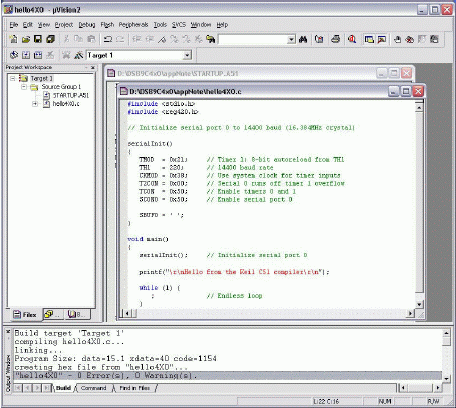
Figure 3. Compilation output from Keil µVision.
The Microcontroller Tool Kit software is available from the Maxim/Dallas website at www.maxim-ic.com.
Once the Microcontroller Tool Kit software is installed, open it. In the initial dialog box, select the device type you are using (DS89C430, DS89C440, or DS89C450). Next, select Options -> Configure Serial Port from the menu. Select the serial port that you are using to connect to the microcontroller system (such as COM1, COM2...) and select a baud rate of 14400 baud.
Power on the High-Speed Microcontroller Evaluation Kit board at this point. The board should be set up as follows.
At the loader prompt, type 'K' and press enter. This erases the flash memory on the DS89C430/440/450. Next, select File -> Load Flash from the menu (or press Ctrl+O). Select the .hex file from your project's compiled output and click Open in the dialog box. A "Loading File...Load complete message should appear."
At this point, simply turn off DIP switch SW4.1 to exit loader mode, and the application should execute and display the demonstration message over serial 0, which will be displayed in the Microcontroller Tool Kit window.
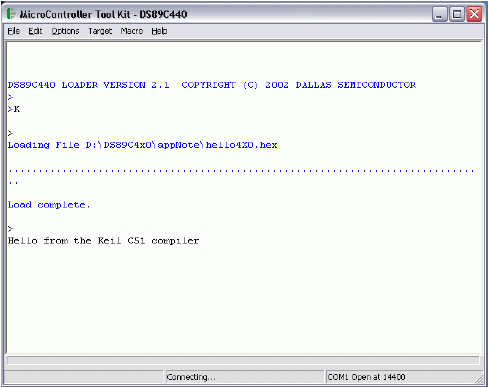
Figure 4. Loading and running the application in MTK.



 关注微信
关注微信