
时间:2023-09-27 15:51
人气:
作者:admin
打开svcsock.c文件中所有的动态输出语句
# echo 'file svcsock.c +p' > /sys/kernel/debug/dynamic_debug/control
打开usbcore模块中所有的动态输出语句
# echo 'module usbcore +p' > /sys/kernel/debug/dynamic_debug/control
打开svc_process()函数中所有的动态输出语句
# echo 'func svc_process() +p' > /sys/kernel/debug/dynamic_debug/control
打开文件路径包含usb的文件里所有的动态输出语句
# echo -n '*usb* +p' > /sys/kernel/debug/dynamic_debug/control
打开系统所有的动态输出语句
# echo -n '+p' > /sys/kernel/debug/dynamic_debug/control
上面是打开动态输出语句的例子,除了能输出pr_debug()/dev_dbg()函数中定义的输出信息外,还能输出一些额外信息,如函数名、行号、模块名字以及线程ID等
另外,还可以在各个子系统的Makefile中添加ccflags来打开动态输出语句
< ../Makefile >

ccflags-y += -DDEBUG
ccflags-y += -DVERBOSE_DEBUG
例如在一个led驱动中的open()、write()等函数开头添加一句pr_debug("%s entern",
**func **** ** );
#include < linux/module.h >
#include < linux/fs.h >
#include < linux/errno.h >
#include < linux/miscdevice.h >
#include < linux/kernel.h >
#include < linux/major.h >
#include < linux/mutex.h >
#include < linux/proc_fs.h >
#include < linux/seq_file.h >
#include < linux/stat.h >
#include < linux/init.h >
#include < linux/device.h >
#include < linux/tty.h >
#include < linux/kmod.h >
#include < linux/gfp.h >

static int major = 0;
static char kernel_buf[1024];
static struct class *hello_class;

#define MIN(a, b) (a < b ? a : b)

static ssize_t hello_drv_read (struct file *file, char __user *buf, size_t size, loff_t *offset)
{
 int err;
 pr_debug("%s entern", __func__);

 err = copy_to_user(buf, kernel_buf, MIN(1024, size));
 return MIN(1024, size);
}

static ssize_t hello_drv_write (struct file *file, const char __user *buf, size_t size, loff_t *offset)
{
 int err;
 pr_debug("%s entern", __func__);
 err = copy_from_user(kernel_buf, buf, MIN(1024, size));
 return MIN(1024, size);
}

static int hello_drv_open (struct inode *node, struct file *file)
{
 pr_debug("%s entern", __func__);
 return 0;
}

static int hello_drv_close (struct inode *node, struct file *file)
{
 pr_debug("%s entern", __func__);
 return 0;
}

/* 2. 定义自己的file_operations结构体                                              */
static struct file_operations hello_drv = {
 .owner  = THIS_MODULE,
 .open    = hello_drv_open,
 .read    = hello_drv_read,
 .write   = hello_drv_write,
 .release = hello_drv_close,
};

static int __init hello_init(void)
{
 int err;

 pr_debug("%s entern", __func__);
 major = register_chrdev(0, "hello", &hello_drv);  /* /dev/hello */

 hello_class = class_create(THIS_MODULE, "hello_class");
 err = PTR_ERR(hello_class);
 if (IS_ERR(hello_class)) {
  unregister_chrdev(major, "hello");
  return -1;
 }

 device_create(hello_class, NULL, MKDEV(major, 0), NULL, "hello"); /* /dev/hello */

 return 0;
}

static void __exit hello_exit(void)
{
 pr_debug("%s entern", __func__);
 device_destroy(hello_class, MKDEV(major, 0));
 class_destroy(hello_class);
 unregister_chrdev(major, "hello");
}

module_init(hello_init);
module_exit(hello_exit);
MODULE_LICENSE("GPL");
为了方面查看,先清除内核输出:
# dmesg -c
然后加载驱动,执行dmesg查看是否有打印:
# insmod hello_drv.ko
# dmesg
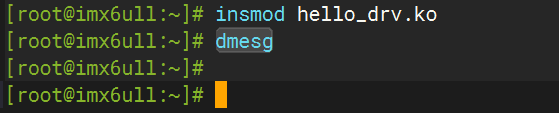
此时没有pr_debug()的打印。这时再使用动态输出打开hello_drv模块的动态输出:
# echo 'module hello_drv +p' > /sys/kernel/debug/dynamic_debug/control
然后执行该驱动的应用层程序,使其调用到驱动的open、write、close函数,从而执行pr_debug():
# ./hello_drv_test -w 10
再查看demsg内容:

可以看到,当打开了hello_drv模块的动态输出后,驱动中的pr_debug()语句就可以正常打印了。
再看看debugfs的control节点:
# cat /sys/kernel/debug/dynamic_debug/control

control节点记录了刚刚执行pr_debug()时的文件名、所在行号、模块名、函数名和输出语句(p表示动态输出的语句)。
上一篇:Linux内核动态输出调试



 关注微信
关注微信