
时间:2023-08-02 16:44
人气:
作者:admin
前言
一般来说,使用 Github Actions 都需要在 Repo 里完成相应的 event 才能够触发(比如push/pull_request等),然后在 Github 提供的服务器(容器)中运行。这样有两个缺点:
每次都需要在 Repo 完成相应的 evenet,操作较为费时。
一个 event 可能会触发多个 Action,并且在 Github 的服务器上运行时需要排队,运行较为耗时。
所以,本文介绍如何在本地运行 Github Actions 来解决上述两个问题,主要有以下两个依赖:
Docker Desktop on Windows(Backend 是 WSL)
act
依赖安装
Docker Desktop on Windows
安装 Docker Desktop on Windows 前需要先安装 WSL,安装 WSL 的操作可以参考官方文档
安装 Docker Desktop on Windows,
进入 Docker Desktop on Windows 时可能会一直停留在 starting the docker engine 界面,可以考虑以下解决方法:
重启 Docker 服务
net stop com.docker.service
net start com.docker.service
先点击右上角登录 Docker 账号
act
act 是在本地运行 Github Actions 的工具,它依赖于 Docker。安装可以参考 nektos/act: Run your GitHub Actions locally ,或者直接在这个仓库的 release 当中下载,只有一个 Windows 可执行文件(exe)。
本地运行 Github Actions
act 使用说明
act [] [options]
If no event name passed, will default to "on: push"
If actions handles only one event it will be used as default instead of "on: push"
act -l
act workflow_dispatch -l
act -j test -l
push) event:act
act pull_request
act -j test
act --artifact-server-path /tmp/artifacts
act -j lint -W .github/workflows/checks.yml
act -n
act -v
示例:RT-Thread 的 Github Actions
进入 RT-Thread 源代码目录(只要进入第一层即可,act 会自动搜索 .github/workflow 目录)
使用act -l查看当前目录下的 Action

可以看到有重名(Job ID)的 Action,所以需要指定要运行的 Action(act -j test -W ..githubworkflowsaction_tools.yml)
如果运行时拉不下镜像可以修改一下 daemon.json 中的镜像源
"registry-mirrors": [
"https://registry.docker-cn.com",
"http://hub-mirror.c.163.com",
"https://docker.mirrors.ustc.edu.cn"
]
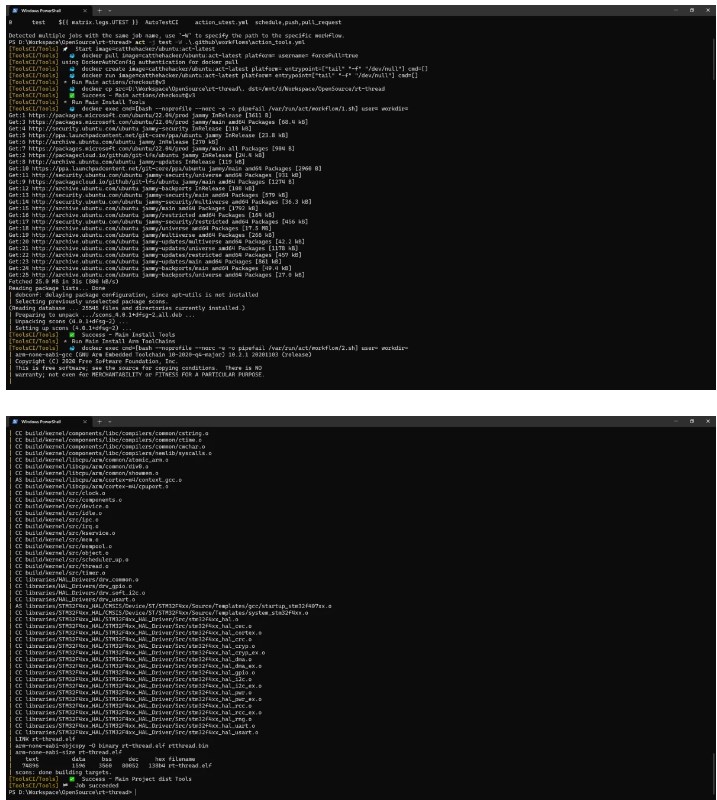
运行结果如下:




 关注微信
关注微信