
时间:2023-06-08 10:19
人气:
作者:admin
本文转自公众号,欢迎关注
Windows下基于MSVC搭建libuvc开发环境 (qq.com)
libuvc是基于libusb的跨平台UVC库。在Mac 和 Linux上可以直接构建(使用cmake),也可以移植到Windows下。
https://github.com/libuvc/libuvc
https://libuvc.github.io/libuvc/
libuvc依赖libusb和pthread,分别参考
Windows下使用pthread-开发环境搭建
Windows下基于MSVC搭建libusb开发环境
搭建对应的环境。
基于MSVC Community 2022。
需要配置好libusb参考开发环境,。
在Mac和Linux下使用CMake可以方便的构建,参考git的readme即可。在windows下我们可以直接添加源码到VS下进行编译。
下载代码
git clone https://github.com/libuvc/libuvc.git
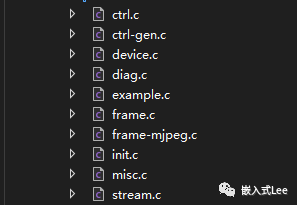
在自己的工程目录下新建libuvc的文件夹
将源码目录的include和src复制到自己工程的libuvc目录下,添加如下代码到工程中
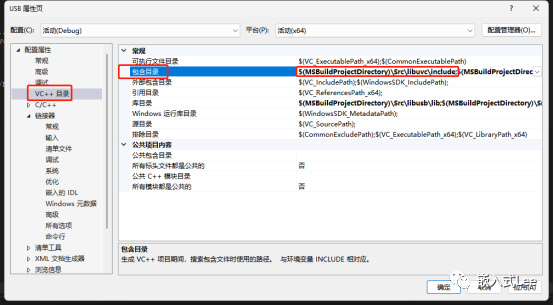
右键点击工程名->属性
添加包含路径
$(MSBuildProjectDirectory)\\Src\\libuvc\\include;
llibuvc\\include\\libuvc下复制一份libuvc_config.h.in改为libuvc_config.h
内容修改如下
#ifndef LIBUVC_CONFIG_H


#define LIBUVC_CONFIG_H


#define LIBUVC_VERSION_MAJOR 0


#define LIBUVC_VERSION_MINOR 0


#define LIBUVC_VERSION_PATCH 6


#define LIBUVC_VERSION_STR "0.0.6"


#define LIBUVC_VERSION_INT \\


((0 < < 16) |             \\


(0 < < 8) |              \\


(6))


/** @brief Test whether libuvc is new enough


* This macro evaluates true if and only if the current version is


* at least as new as the version specified.


*/


#define LIBUVC_VERSION_GTE(major, minor, patch) \\


(LIBUVC_VERSION_INT >= (((major) < < 16) | ((minor) < < 8) | (patch)))


/* #undef LIBUVC_HAS_JPEG */


#endif // !def(LIBUVC_CONFIG_H)
lfatal error C1083: 无法打开包括文件: “sys/time.h”: No such file or directory
先注释掉#include 改为 #include
l1>C:\\Users\\qinyunti\\OneDrive\\wuqi\\usb\\USB_VS\\USB\\Src\\libuvc\\include\\libuvc\\libuvc.h(475,19): error C2079: “capture_time_finished”使用未定义的 struct“timespec”
添加#include
l1>C:\\Users\\qinyunti\\OneDrive\\wuqi\\usb\\USB_VS\\USB\\Src\\libuvc\\src\\example.c(3,10): fatal error C1083: 无法打开包括文件: “unistd.h”: No such file or directory
注释掉该头文件
l1>C:\\Users\\qinyunti\\OneDrive\\wuqi\\usb\\USB_VS\\USB\\Src\\libuvc\\src\\stream.c(662,38): error C2065: “CLOCK_MONOTONIC”: 未声明的标识符
(void)clock_gettime(CLOCK_MONOTONIC, &strmh->capture_time_finished);
改为
timespec_get(&strmh->capture_time_finished, TIME_UTC);
l1>C:\\Users\\qinyunti\\OneDrive\\wuqi\\usb\\USB_VS\\USB\\Src\\libuvc\\src\\device.c(560,35): error C4996: 'strdup': The POSIX name for this item is deprecated. Instead, use the ISO C and C++ conformant name: _strdup. See online help for details.
strdup改为_strdup
l1>C:\\Users\\qinyunti\\OneDrive\\wuqi\\usb\\USB_VS\\USB\\Src\\libuvc\\src\\device.c(165): error C4703: 使用了可能未初始化的本地指针变量“test_dev”
uvc_device_t *test_dev;改为

uvc_device_t *test_dev = 0;
l1>example.obj : error LNK2001: 无法解析的外部符号 sleep
添加#include < windows.h >

sleep(10);改为Sleep(10000)
先切换驱动
下载打开zadig-2.8.exe
Options->List All Devices
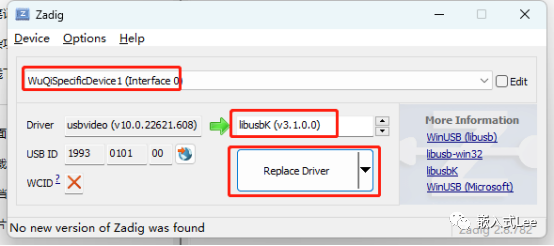
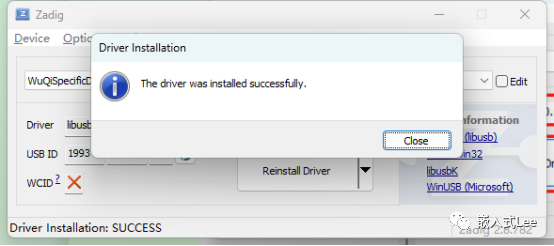
将pthread.dll复制到exe所在目录
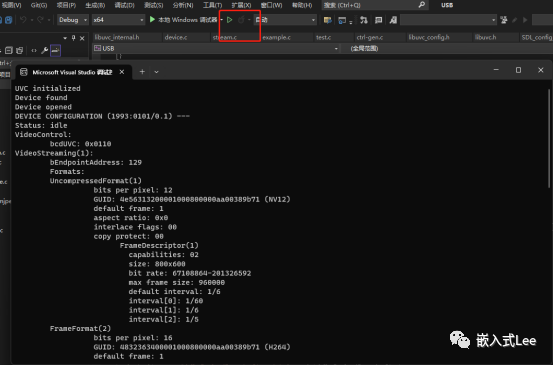
然后运行,可以看到打印的设备信息
审核编辑:汤梓红



 关注微信
关注微信