
时间:2023-03-08 09:54
人气:
作者:admin
NGINX 是一个通用且流行的应用程序。也是最流行的 Web 服务器,它可用于提供静态文件内容,但也通常与其他服务一起用作分布式系统中的组件,在其中它用作反向代理、负载均衡 或 API 网关。
分布式追踪 distributed tracing 是一种可用于分析与监控应用程序的机制,将追踪在从源到目的的整个过程中的单个请求,这与仅通过单个应用程序域来追踪请求的形式不同。
换句话说,我们可以说分布式追踪是对跨多个系统的多个请求的拼接。拼接通常由一个或多个相关 ID 完成,并且跟踪通常是一组记录的、跨所有系统的结构化日志事件,存储在一个中心位置。
在这种背景的情况下, OpenTracing 应运而生。OpenTracing 是一个与应用供应商无关的 API,它可帮助开发人员轻松地跟踪单一请求的域。目前有多种开源产品都支持 OpenTracing(例如,Jaeger, skywalking 等),并将其作为一种检测分布式追踪的标准化方法。
本文将围绕,从 0 到 1 实现在 nginx 配置分布式追踪的架构的简单实例说明。本文实例使用的组件为
nginx-opentracing[5] 仓库中可以看到,官方为每个 nginx 版本都提供了一个编译好的动态库(Nginx1.19.13+),我们可以直接拿来使用这个动态库,如果你想将这个利用 Nginx 提供的编译参数 --add-module=/path/to/module 构建为 nginx 的内置功能的话,可能会出现一些问题,例如下面的一些错误:
ngx_http_opentracing_module.so/configwasfound
/root/nginx-opentracing-0.25.0/opentracing//src/ngx_http_opentracing_module.cpp
Infileincludedfrom/root/nginx-opentracing-0.25.0/opentracing//src/ngx_http_opentracing_module.cpp0:
/root/nginx-opentracing-0.25.0/opentracing//src/load_tracer.h38:fatalerror:opentracing/dynamic_load.h:Nosuchfileordirectory
根据 issue[6] 中查询得知 nginx-opentracing 需要嵌入到 nginx 中,是需要一些 opentracing-cpp[7] 因为对 c++不熟,尝试调试很久还是上面的错误,故直接使用了官方提供的动态库。
根据 nginx-opentracing 中提到的,还需要一个 jaeger-client-cpp[8] 的 tracer 才可以正常运行(这也是作为 jaeger 架构中的角色)
来到 jaeger-client-cpp 看到 Release 提供的编译好的动态库已经很久了,而最新版都没有提供相应编译的版本,需要我们自己编译
说明:编译依赖 CMake 3.3+,gcc 4.9.2+
我们的编译环境使用 CentOS 7 默认 gcc 与 CMake 都符合要求需要自行编译两个的版本。
gcc 下载地址:
https://ftp.gnu.org/gnu/gcc/[9]
cdgcc-5.4.0
./contrib/download_prerequisites

mkdirgcc-build-5.4.0
cdgcc-build-5.4.0

/usr/local/src/gcc-5.4.0/configure
--enable-checking=release
--enable-languages=c,c++
--disable-multilib

make&&makeinstall
参考这篇文章:升级 GCC[10]
cd/usr/bin/
mvgccgcc_back
mvg++g++_back
ln-s/usr/local/bin/gccgcc
ln-s/usr/local/bin/g++g++
编译时遇到几个问题
/lib64/libstdc++.so.6: version GLIBCXX_3.4.20' not found
gcc 编译,libgcc动态库有改动,恢复原状即可
configure:error:C++compilermissingorinoperational

make[2]:***[configure-stage1-libcpp]Error1
make[2]:Leavingdirectory`/home/clay/programming/C++/gcc-4.8.1'
make[1]:***[stage1-bubble]Error2
make[1]:Leavingdirectory`/home/clay/programming/C++/gcc-4.8.1'
make:***[all]Error2
./configure--prefix=/path/to/app

make
makeinstall
这里遇到一个小问题 编译过程中遇到 [libstdc++.so.6: version GLIBCXX_3.4.20 not found
因为这里使用了自己编译的 gcc 版本,需要指定下动态库的路径[11]
LD_LIBRARY_PATH=/usr/local/lib64./configure--prefix=/usr/local/cmake
这里根据官方提供的步骤操作即可
cdjaeger-client-cpp-0.9.0/
mkdirbuild
cdbuild
#这里建议使用下特色上网,编译过程中会使用Hunter自动下载所需的依赖项
ALL_PROXY=http://x.0.0.x:10811/usr/local/cmake/bin/cmake..
make
注:依赖项挺大的,下载时间可能很长,会 hang 主,只需等待结束即可
编译完成后 libjaegertracing.so.0.9.0 则是我们需要的
./configure
--user=web_www
--group=web_www
--with-pcre
--with-compat
--with-http_ssl_module
--with-http_gzip_static_module
--prefix=/root/nginx
--with-http_stub_status_module
--with-compat 必须加上,表面允许使用动态库,否则编译完在启动时会报下面的错误
nginx:[emerg]module"/root/nginx/conf/ngx_http_opentracing_module.so"isnotbinarycompatiblein/root/nginx/conf/nginx.conf:1
遇到的问题,cc nou found,这里只需将 gcc 软连接一份为 cc 即可
jaeger.json,参数的说明可以参考configuration[12]
{
"service_name":"nginx",//服务名
"sampler":{
"type":"const",
"param":1
},
"reporter":{
"localAgentHostPort":"jaeger:6831"//jaegeragent的地址
},
"headers":{//jaeger的默认的jaegerBaggage头设置
"jaegerDebugHeader":"jaeger-debug-id",
"jaegerBaggageHeader":"jaeger-baggage",
"traceBaggageHeaderPrefix":"uberctx-"
},
"baggage_restrictions":{
"denyBaggageOnInitializationFailure":false,
"hostPort":""
}
}
对于更多的 nginx-opentracing 的配置说明参数可以参考 Reference.md[13]
#加载 OpenTracing 动态模块。
load_moduleconf/ngx_http_opentracing_module.so;
worker_processes1;
userrootroot;

events{
worker_connections1024;
}
http{
log_formatopentracing'{"timestamp":"$time_iso8601",'
'"source":"$server_addr",'
'"hostname":"$hostname",'
'"ip":"$http_x_forwarded_for",'
'"traceID":"$opentracing_context_uber_trace_id",'
'"client":"$remote_addr",'
'"request_method":"$request_method",'
'"scheme":"$scheme",'
'"domain":"$server_name",'
'"referer":"$http_referer",'
'"request":"$request_uri",'
'"args":"$args",'
'"size":$body_bytes_sent,'
'"status":$status,'
'"responsetime":$request_time,'
'"upstreamtime":"$upstream_response_time",'
'"upstreamaddr":"$upstream_addr",'
'"http_user_agent":"$http_user_agent",'
'"https":"$https"'
'}';
#加载tracer,这里使用的jaeger,需要传递配置文件
opentracing_load_tracerconf/libjaegertracing.soconf/jaeger.json;
#启用tracing
opentracingon;
#设置tag,可选参数
opentracing_taghttp_user_agent$http_user_agent;
includemime.types;
default_typeapplication/octet-stream;
sendfileon;
keepalive_timeout65;
server{
listen80;
server_namelocalhost;
location/{
opentracing_operation_name$uri;
opentracing_propagate_context;
roothtml;
indexindex.htmlindex.htm;
}
access_loglogs/access.logopentracing;
error_page500502503504/50x.html;
location=/50x.html{
roothtml;
}
}
}
注:这里使用的 opentracing-nginx 的动态库为 ot16 ,linux-amd64-nginx-1.22.0-ot16-ngx_http_module.so.tgz ,另外一个版本不兼容,-t 检查语法时会提示
对于每一个 location 都可以对其设置别名,这个就是 opentracing_operation_name 与 opentracing_location_operation_name 的区别
http{
...
location=/upload/animal{
opentracing_location_operation_nameupload;
...
更多的配置说明可以参考 Tutorial.md[14]
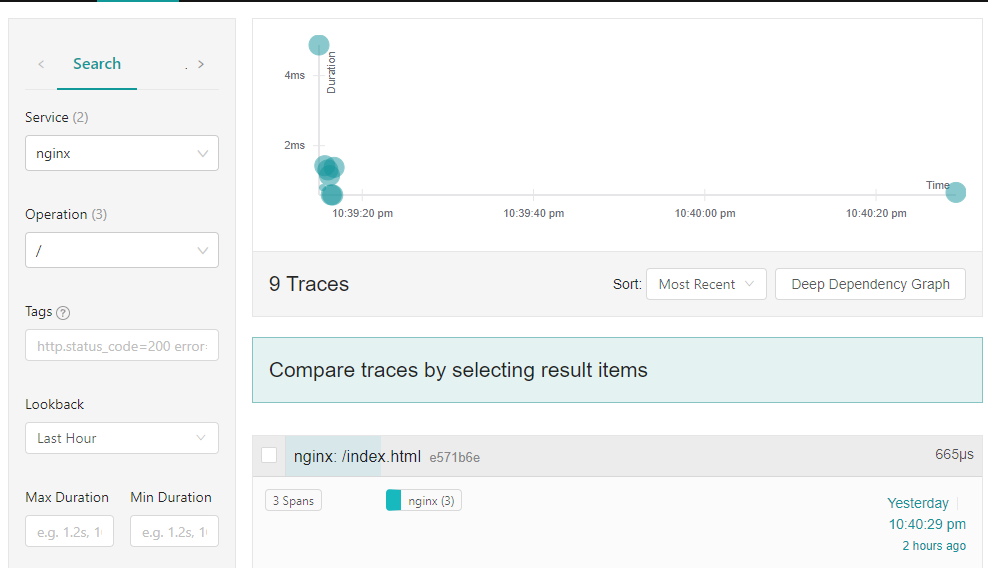
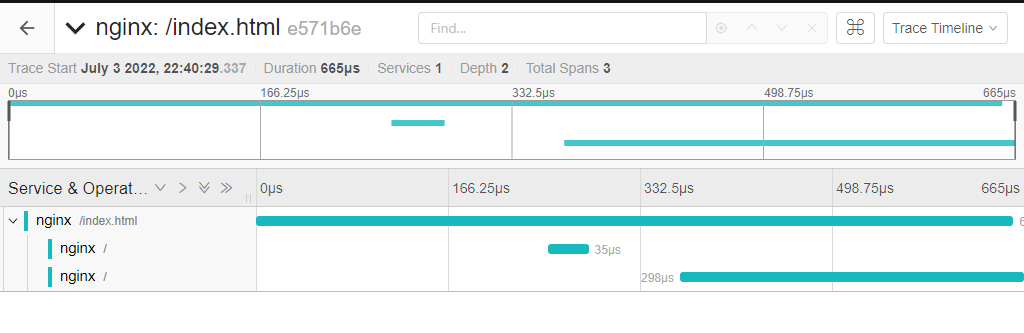
此时我们可以在 jaeger 上查看,可以看到 NGINX 的 span(因为这里只配置了 NGINX,没有配置更多的后端)。
下一篇:C语言实现面向对象的方法






 关注微信
关注微信