
时间:2023-02-23 09:22
人气:
作者:admin
目的:
每天自动接收附件为excel表格的邮件,里面包含客户端IP地址、客户端MAC地址、客户端计算机名、交换机端口、交换机的名字等信息。可以给运维人员带来一些方便,直观的查看那些非法的设备接入交换机的那个端口,方便远程shutdown端口(自动shutdown端口和DHCP拉黑MAC地址,还在编写中)。
思路: 1、用python代码抓取交换机的上面的信息,例如客户端的MAC地址,交换机端口,并把抓取的信息筛选,存入sqlserver数据库。 2、用Powershell抓去DHCP的信息,筛选客户端的MAC地址,计算机名信息存入sqlserver数据库。 3、通过Python代码,调用SQL语句,把输出结果保存到excel表格。 4、通过Python代码,发送邮件。 5、linux通过crontab,Powershell通过自动任务计划,每天定时执行代码和脚本。代码块1:抓取交换机信息代码,并保存到本地的txt。
importpexpect
importsys
importdatetime
importos

			today=datetime.date.today().strftime('%Y%m%d')

			path="/root/F5/"+today#创建文件夹

			os.mkdir(path,777)

			ip='x.x.x.x'

			passwd='^^^^^'

			txt='F51FA-x.x.x.x.txt'

			name=''#交换机名字

			name1="----More----"

			child=pexpect.spawn('telnet%s'%ip)#telnet交换机

			fout=open('/root/F5/'+today+'/'+txt,'wb+')#输出结果保存到此txt

			child.logfile=fout

			child.expect('Username:')

			child.sendline("admin")

			child.expect('(?i)ssword:')

			child.sendline("%s"%passwd)

			child.expect("%s"%name)

			child.sendline("dislldpneighbor-informationlist")

			child.expect("%s"%name)

			child.sendline("dismac-address")
foriinrange(10):

			index=child.expect([name1,"%s"%name])#命令输出结果如果需要空格翻页

			if(index==0):

			child.send("")

			else:

			child.sendline("quit")#如果还有其它命令可以写在这里

sys.exit()powershell抓取DHCP信息,并输出到数据库。
#数据库配置信息

			$Database = 'MAC'

			$Server = 'xx'

			$UserName = 'sa'

			$Password = 'xx'

			#powershell 抓取DHCP 可以看网页 http://blog.51cto.com/wenzhongxiang/2065645


			#读取DHCPLease记录

			#$DhcpLeaseResult1 = Get-DhcpServerv4Scope -ComputerName x.x.x.x |Get-DhcpServerv4Lease -ComputerName x.x.x.x |Select-Object IPAddress,ClientId,HostName #这个命令是抓取DHCP服务器 x.x.x.x 的所有信息 只输出IPAddress,ClientId,HostName 三列

			$DhcpLeaseResult1 = Get-DhcpServerv4Lease -ComputerName x -ScopeId y.y.y.y |Select-Object IPAddress,ClientId,HostName

			#抓取DHCP服务器X(名字或者IP),y.y.y.y作用域的信息,只输出IPAddress,ClientId,HostName三列

			#创建连接对象

			$SqlConn = New-Object System.Data.SqlClient.SqlConnection


			#使用账号连接MSSQL

			$SqlConn.ConnectionString = "Data Source=$Server;Initial Catalog=$Database;user id=$UserName;pwd=$Password"


			#打开数据库连接

			$SqlConn.open()

			#清空数据库里DHCPLease记录

			$SqlCmd = $SqlConn.CreateCommand()

			$SqlCmd.commandtext = 'TRUNCATE TABLE [MAC].[dbo].[DHCPF51F]' #数据库表要提前建立好

			$SqlCmd.ExecuteScalar()


			#插入最新的DHCPLease记录

			foreach($x in $DhcpLeaseResult1)

			{

			Write-Host $x.IPAddress.IPAddressToString,$x.ClientId,$x.HostName

			$SqlCmd.commandtext = "INSERT INTO [MAC].[dbo].[DHCPF51F] (IP,MAC,Hostname) VALUES('{0}','{1}','{2}')" -f $x.IPAddress.IPAddressToString,$x.ClientId,$x.HostName

			$SqlCmd.ExecuteScalar()

			}

			#

			#关闭数据库连接

			$SqlConn.close()


Exit把txt文档截取需要的信息,输出到数据库。
importos
importsys
importpymssql
importdatetime
#数据库信息

			host='x.x.x.x'

			user='sa'

			pwd='x.x.x.x'

			db='MAC'
#登录数据库,并清空[MACF51F]表的内容

			conn=pymssql.connect(host=host,user=user,password=pwd,database=db,timeout=1,login_timeout=1,charset="utf8")

			cur=conn.cursor()

			sqls="deletefrom[dbo].[MACF51F]"#数据库表要提前建好

			cur.execute(sqls)

			conn.commit()

			conn.close()

			today=datetime.date.today().strftime('%Y%m%d')

			path="/root/F5/"+today

			list1=os.listdir(path)#读取文件夹下所有txt文件,注意不要放其它文档,否则需要写判定语句。
defgetid(linea,lineb):

			conn=pymssql.connect(host=host,user=user,password=pwd,database=db,timeout=1,login_timeout=1,charset="utf8")

			cur=conn.cursor()

			sqls1="insertinto[MACF51F]values('%s','%s','%s')"%(linea,lineb,name)#sql语句插入数据,并命名列

			print(sqls)

			cur.execute(sqls1)

			conn.commit()

			conn.close()

fortxtinlist1:

			file=open('%s/%s'%(path,txt),'r+')#打开文件夹下的所有文档

			name=txt[:-4]

			print(txt)

			print(name)


			forlineinfile.readlines():


			if'Learned'inline:

			if'More'inline:#截取MAC地址,由于dhcp拉出来的MAC格式为xx-xx-xx-xx-xx-xx,所以我门要把交换机MACXXXX-xxxx-xxxx格式改为统一的

			#linea=(line[43:57]).rstrip()

			linea=(line[43:45]+'-'+line[45:48]+line[48:50]+'-'+line[50:53]+line[53:55]+'-'+line[55:57]).rstrip()

			lineb=(line[84:107]).rstrip()

			else:

			#linea=(line[0:15]).rstrip()

			linea=(line[0:2]+'-'+line[2:5]+line[5:7]+'-'+line[7:10]+line[10:12]+'-'+line[12:14]).rstrip()

			lineb=(line[41:65]).rstrip()

			print(linea)

			print(lineb)

getid(linea,lineb)抓取两个表中MAC地址一样的信息,并串接成一个表,并做成excel。
importpymssql

			importxlwt

			importdatetime


			workbook=xlwt.Workbook()

			today=datetime.date.today().strftime('%Y%m%d')

			sheet1=workbook.add_sheet('sheet1',cell_overwrite_ok=True)#定义sheet1

			sheet1.write(0,0,'HotName')#设置列头的名字0,0代表0行0列

			sheet1.write(0,1,'MACAddress')

			sheet1.write(0,2,'IPAddress')

			sheet1.write(0,3,'Port')

			sheet1.write(0,4,'SwitchName')


			defexceladd(HotName,MACAddress,IPAddress,Port,SwitchName,index):

			sheet1.write(index,0,HotName)

			sheet1.write(index,1,MACAddress)

			sheet1.write(index,2,IPAddress)

			sheet1.write(index,3,Port)

			sheet1.write(index,4,SwitchName)


			host='x.x.x.x'

			user='sa'
pwd='x'

			db='MAC'

			conn=pymssql.connect(host=host,user=user,password=pwd,database=db,timeout=1,login_timeout=1,charset="utf8")

			cur=conn.cursor()

			sqls="selectHostname,mac,ip,port,Switchnamefrom[dbo].[MACF51F]join[dbo].[DHCPF51F]onMAC=MACADDwherePort<>'GigabitEthernet1/0/24'orderbySwitchname,Port"#SQL命令24口是上联口排除

			cur.execute(sqls)


			listall=cur.fetchall()#抓取sql输出的每一行信息,并分解保存到excel表中。

			index=1
forlineinlistall:

			exceladd(line[0],line[1],line[2],line[3],line[4],index)

			index+=1

			conn.commit()

			conn.close()

print('创建excel文件完成!')

workbook.save('/root/F5/%sF51FMAC.xls'%today)#保存excel发送邮件代码
#coding:utf-8
fromemail.mime.textimportMIMEText
fromemail.mime.multipartimportMIMEMultipart
importsmtplib
importdatetime
fromemailimportencoders
fromemail.mime.imageimportMIMEImage
fromemail.mime.baseimportMIMEBase


			today=datetime.date.today().strftime('%Y%m%d')
defsendmail():


			#创建一个带附件的实例

			msg=MIMEMultipart()

			ctype='application/octet-stream'

			maintype,subtype=ctype.split('/',1)

			file=MIMEBase(maintype,subtype)

			file.set_payload(open(r'/root/F5/%sF51FMAC.xls'%today,'rb').read())

			file.add_header('Content-Disposition','attachment',filename='%sF51FMAC.xls'%today)

			encoders.encode_base64(file)

			msg.attach(file)

			#加邮件头

			msg_to=['xxx@xxx.com','xx@xxx.com','Klaus.Wang@xx.com','Eric.lai@xx.com']

			msg['from']='xxx@xx.com'

			msg['subject']=u"[接入巡检]%s"%today

			msg.attach(MIMEText('接入MAC地址记录如附件','plain','utf-8'))


			msg['to']=','.join(msg_to)#群发需要增加的,隐藏收件人不需要此行,直接调用msg_to就可以

			server=smtplib.SMTP()

			server.connect('10.17.37.96',25)#SMTP服务器地址

			#server.connect('xx.quantacn.com',25)#需要认证的邮件服务器

			#server.login('xx@xx.com','xxxxxxx')#XXX为用户名,XXXXX为密码

			#server.sendmail(msg['from'],msg['to'],msg.as_string())单独一个收件人

			server.sendmail(msg['from'],msg['to'].split(','),msg.as_string())#收件人为多个

			#server.sendmail(msg['from'],msg_to,msg.as_string())

			server.quit()

			return'发送成功'

print(sendmail())定期的任务计划:1、Powershell通过windwos服务器的任务计划每天自动更新DHCP的信息
2、linux服务器通过crontab命令 定制python代码的任务计划
成果:
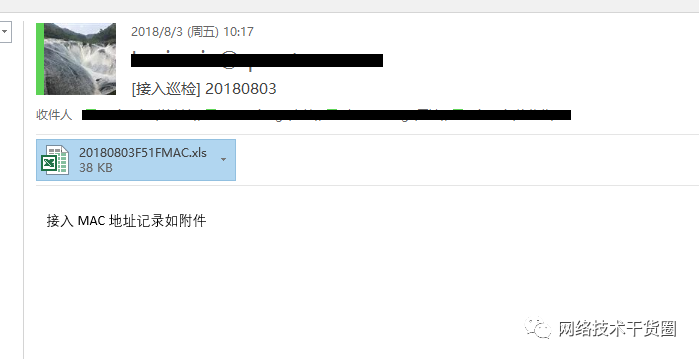
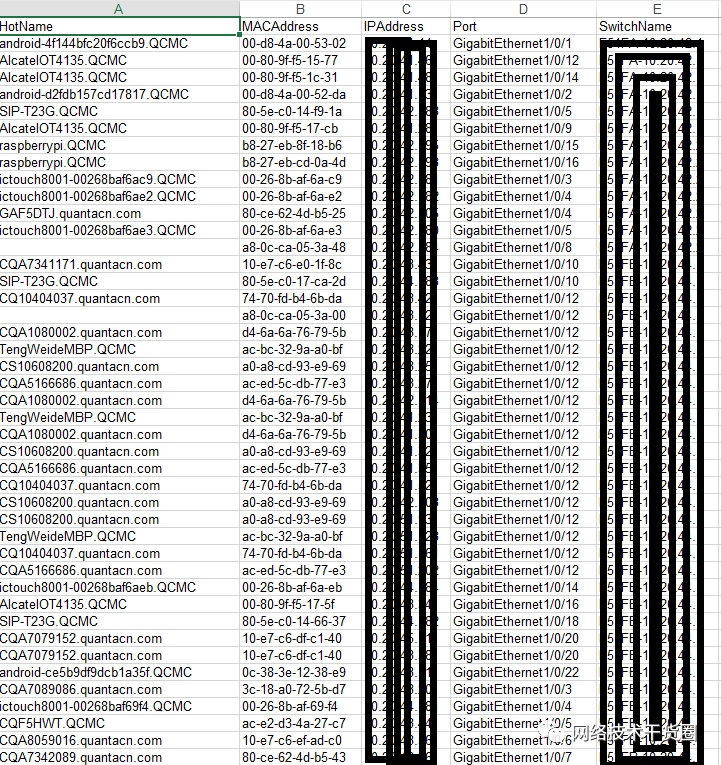 总结:
总结:后期会实现异常端口自动shutdown,和异常客户端DHCP拉黑MAC地址。





 关注微信
关注微信