
时间:2009-03-31 09:48
人气:
作者:admin
Implementing an Eight-to-One USB Switch for KVM Applications |
Abstract: Many servers need to be able to switch video, keyboard, mouse, and perhaps audio signals from one of several computers to a front panel. This application note focuses on the keyboard/mouse portion, and presents a circuit for implementing an 8:1 USB switch with the MAX4999. By placing a hub at the MAX4999 output, the design ensures that anything connected to the hub will be slaved to only one source. IntroductionUsers often need to access data through the front panel of a server chassis, requiring that the server be able to switch between multiple channels. Maxim offers several devices such as the MAX4999 to make this application easier to accomplish and more reliable.The MAX4999 is a single-chip device that can multiplex a single USB common terminal to as many as eight USB channels at data rates up to 480Mbps (USB 2.0). This device features rail-to-rail signal handling for compatibility with low- and full-speed applications and bandwidth in excess of 900MHz to handle high-speed signals. Keyboard/Mouse Switching CircuitAlthough it is possible to switch PS-2 signals to support the keyboard/mouse requirement, PS-2 keyboard/mouse use is waning. USB is so much more useful and, thus, has virtually replaced PS-2 as the preferred protocol for keyboard and mouse applications. Therefore, this article will focus on the USB keyboard/mouse.Figure 1 illustrates a circuit for implementing an 8:1 USB switch to support keyboard/mouse switching. If one USB port is switched from each of the eight sources, there will be a switched high-frequency pair coming from one of the eight sources to the MAX4999 common pins. One USB port will have enough bandwidth to handle the keyboard, mouse, and most common USB devices. The keyboard and mouse will most likely operate at low-speed USB. The MAX4999 simply needs a 3-bit address, and another single bit if the enable pin (EN) is used. By selecting a 3-bit address, a single MAX4999 can connect one of eight pairs to its common pair. The fourth bit is wired to the EN pin and used to set the device into high-impedance state (standby mode), in which it consumes ≤ 3µA. A DIP switch will be assumed for selecting a particular source, but a microcontroller would likely be used for a production environment. 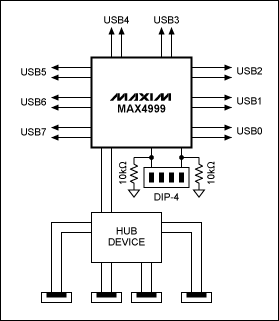 Figure 1. By placing a hub at the MAX4999 output, this design ensures that anything connected to the hub will be slaved to only one source. Power for the MAX4999 needs to come from a 3.3V source. It is assumed that a 5.0V power supply capable of 2.0A or more will be available. This supply will be used to deliver the minimum current needed for the MAX4999 through an LDO, and to supply current for the (4-port) hub. The current-handling portion of the hub will take care of supplying limited current to each of the hub’s four ports. |

从profibusDP转ModbusTCP,一网打尽转换技巧!


 关注微信
关注微信