
时间:2023-05-09 17:17
人气:
作者:admin
gcc有哪些常用选项,今天,就来给大家盘点一下。
-E表示预处理,处理所有以井号键开头的代码,常见的比如把头文件展开。
hello.c
#include预处理:int main() { printf("helloworld "); return 0; }
gcc -E hello.c -o hello.i预处理后的文件:
# 1 "hello.c" # 1 "-S表示编译,把C文件变成汇编文件。" # 1 " " # 31 " " # 1 "/usr/include/stdc-predef.h" 1 3 4 # 32 " " 2 # 1 "hello.c" # 1 "/usr/include/stdio.h" 1 3 4 # 27 "/usr/include/stdio.h" 3 4 # 1 "/usr/include/x86_64-linux-gnu/bits/libc-header-start.h" 1 3 4 # 33 "/usr/include/x86_64-linux-gnu/bits/libc-header-start.h" 3 4 # 1 "/usr/include/features.h" 1 3 4 # 461 "/usr/include/features.h" 3 4 # 1 "/usr/include/x86_64-linux-gnu/sys/cdefs.h" 1 3 4 # 452 "/usr/include/x86_64-linux-gnu/sys/cdefs.h" 3 4 # 1 "/usr/include/x86_64-linux-gnu/bits/wordsize.h" 1 3 4 # 453 "/usr/include/x86_64-linux-gnu/sys/cdefs.h" 2 3 4 # 1 "/usr/include/x86_64-linux-gnu/bits/long-double.h" 1 3 4 # 454 "/usr/include/x86_64-linux-gnu/sys/cdefs.h" 2 3 4 # 462 "/usr/include/features.h" 2 3 4 # 485 "/usr/include/features.h" 3 4 # 1 "/usr/include/x86_64-linux-gnu/gnu/stubs.h" 1 3 4 # 10 "/usr/include/x86_64-linux-gnu/gnu/stubs.h" 3 4 # 1 "/usr/include/x86_64-linux-gnu/gnu/stubs-64.h" 1 3 4 # 11 "/usr/include/x86_64-linux-gnu/gnu/stubs.h" 2 3 4 # 486 "/usr/include/features.h" 2 3 4 # 34 "/usr/include/x86_64-linux-gnu/bits/libc-header-start.h" 2 3 4 # 28 "/usr/include/stdio.h" 2 3 4 # 1 "hello.c" # 1 " " # 1 " " # 31 " " # 1 "/usr/include/stdc-predef.h" 1 3 4 # 32 " " 2 # 1 "hello.c" # 1 "/usr/include/stdio.h" 1 3 4 # 27 "/usr/include/stdio.h" 3 4 # 1 "/usr/include/x86_64-linux-gnu/bits/libc-header-start.h" 1 3 4 # 33 "/usr/include/x86_64-linux-gnu/bits/libc-header-start.h" 3 4 # 1 "/usr/include/features.h" 1 3 4 # 461 "/usr/include/features.h" 3 4 # 1 "/usr/include/x86_64-linux-gnu/sys/cdefs.h" 1 3 4 # 452 "/usr/include/x86_64-linux-gnu/sys/cdefs.h" 3 4 # 1 "/usr/include/x86_64-linux-gnu/bits/wordsize.h" 1 3 4 # 453 "/usr/include/x86_64-linux-gnu/sys/cdefs.h" 2 3 4 .....
gcc -S hello.c -o hello.s汇编后的文件变成:
    .file   "hello.c"
    .text
    .section    .rodata
.LC0:
    .string "helloworld"
    .text
    .globl  main
    .type   main, @function
main:
.LFB0:
    .cfi_startproc
    endbr64
    pushq   %rbp
    .cfi_def_cfa_offset 16
    .cfi_offset 6, -16
    movq    %rsp, %rbp
    .cfi_def_cfa_register 6
    ......
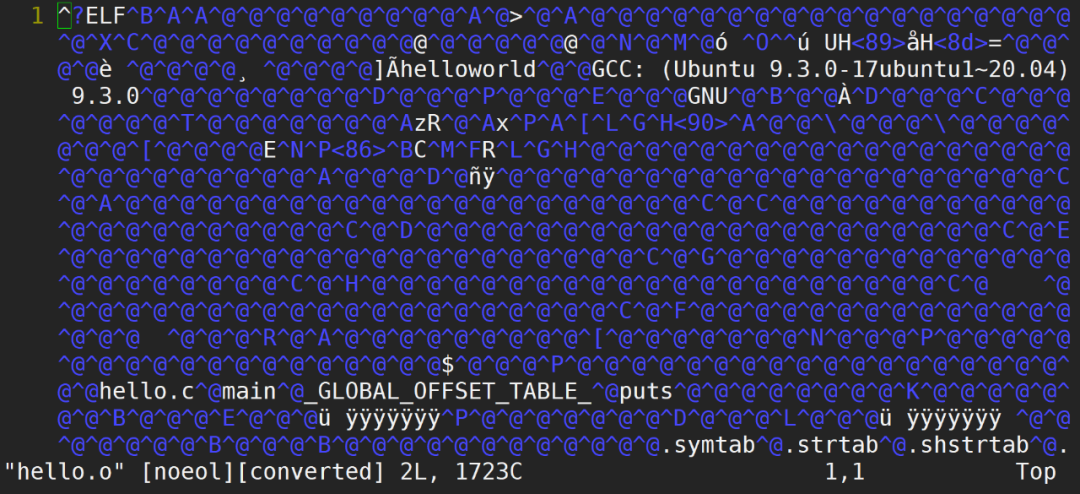
-c表示汇编,把汇编文件变成二进制文件,但是这个二进制文件还不能运行,因为缺少库的信息。gcc -c hello.c -o hello.o汇编后的文件是二进制文件,用vim打开后是这样:
#include编译:#include #include void *my_thread(void *arg) { printf("this is my thread ... "); } int main() { pthread_t tid; if (pthread_create(&tid, NULL, my_thread, NULL) != 0) { perror("pthread_create"); exit(1); } void *status; pthread_join(tid, &status); return 0; }
gcc thread.c -o thread -lpthread-L表示库的路径。如果是你自己制作的库文件,并且没有放在系统指定的目录下,比如 /lib,那编译的时候就要加上库的路径,否则,编译器找不到库在哪。
root@Turbo:test# ls
hello.c  libtest.so
如果编译的时候需要链接 libtest.so,则:
gcc main.c -o main -ltest -L .-I表示头文件路径,常用于自己写的头文件,不在当前目录下,那编译的时候就得指定头文件的路径。
#include"hello.h"hello.h存放在上一级目录:
root@Turbo:test# ls
hello.c
root@Turbo:test# ls ..
hello.h  test
编译的时候,需要指定头文件的路径:
gcc hello.c -o hello -I ..-g表示可以调试,比如我们之前讲的gdb、valgrind,如果想要调试的时候显示源码、行号,编译的时候就需要加上-g选项。
gcc hello.c -o hello -g-O表示优化,可以是O0到O3,我们之前讲volatile的时候,就用过这个选项,不同的优化等级,对代码的处理略微有些区别。
#include不优化:#include void delay() { int i, j; for (i = 0; i < 100000; i++) { for (j = 0; j < 10000; j++); } } int main() { printf("%ld ", time(NULL)); delay(); printf("%ld ", time(NULL)); return 0; }
gcc hello.c -o hello运行结果:
root@Turbo:test# ./hello
1683603927
1683603929
root@Turbo:test#
优化:
gcc hello.c -o hello -O3运行结果:
root@Turbo:test# ./hello
1683603941
1683603941
root@Turbo:test#
当然,还有 -o,表示输出的意思,用来指定编译后生成文件的名字。
gcchello.c-o hello-Wall表示打开所有警告,有时候编译器会认为一些不规范的写法影响不大,并不会提示出来,加上Wall,会把这些不重要的警告也打印出来。
#include不打开警告编译:int main() { int i; return 0; }
root@Turbo:test# gcc hello.c -o hello
root@Turbo:test#
打开警告编译:
root@Turbo:test# gcc hello.c -o hello -Wall
hello.c: In function ‘main’:
hello.c:5:6: warning: unused variable ‘i’ [-Wunused-variable]
    5 |  int i;
      |      ^
root@Turbo:test#
-D表示添加宏定义,调试代码的时候非常有用,可以避免每次都要修改代码。#include编译不提供宏定义:int main() { #ifdef HELLO printf("helloworld "); #endif return 0; }
gcc hello.c -o hello运行结果:
root@Turbo:test# ./hello
root@Turbo:test#
编译提供宏定义:
root@Turbo:test# gcc hello.c -o hello -DHELLO
root@Turbo:test#
运行结果:
root@Turbo:test# ./hello
helloworld
审核编辑:刘清
上一篇:基于stm32物联网开发板(1)






 关注微信
关注微信